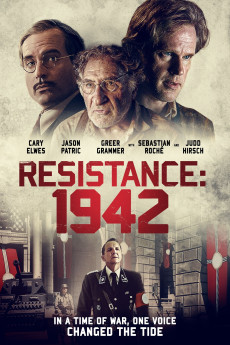
Burning at Both Ends (2021)
Género: Drama , Thriller , War
Año: 2021
Formato: 4K
Runtime: 110
Resumen
1942. France is under Nazi control. The Allies have been pushed off the continent and their defeat in North Africa seems likely. Germany's victory is nearly absolute. Under this dark shadow, a man named Jacques (Cary Elwes) uses a radio to broadcast a message of hope. He hides in an attic with his daughter Juliet (Greer Grammer) and a small group of fellow survivors (Judd Hirsch, Mira Furlan), playing a deadly game of cat and mouse with the German occupiers. The world becomes too dangerous when the Gestapo send Captain Klaus Jager (Sebastian Roche) to catch Jacques. As Klaus closes in, Jacques and his small group make a desperate bid to escape their pursuer, trusting themselves to the help of enigmatic Andre (Jason Patric), a Swiss banker. In the end, that trust may turn out to be the very thing that leads the hunter to his prey.
También te puede interesar
Pasos para descargar y ver
1. ¿Cómo descargar?
Lo primero que hay que entender es que los contenidos no están alojados en nuestro servidor sino que se comparten entre usuarios. Al pinchar en descargar estás dando a un enlace que te da la información necesaria para descargar con el BitTorrent.
2. ¿Qué es el BitTorrent?
Todas las películas, series y demás, los tienen usuarios como tú en su ordenador y tú descargas de ellos y otros descargarán de ti. Es el sistema P2P (peer to peer). En nuestra web se comparte por el BitTorrent que es un sistema P2P muy conocido.
Para poder descargar las cosas necesitarás tener instalado un cliente Torrent.
3. ¿Qué cliente BitTorrent utilizar?
Hay varios clientes Torrent. Nosotros recomentamos utilizar el bitTorrent. Es muy ligero, fácil de usar, sin publicidad, no ralentiza tu ordenador…
Aquí podrás encontrar un manual sobre el BitTorrent y cómo instalarlo y configurarlo:
4. ¿Cómo ver las películas y series?
Si después de descargar axluna película o serie, tienes problemas para verla u oirla, te recomendamos que hagas lo siguiente.
Instala un pack de códecs, nosotros recomendamos el CCCP:
Si no lo tienes instalado, instálate este reproductor de vídeo, el Windows Media Player Classic:
https://www.free-codecs.com/download/Media_Player_Classic.htm
Reinicia el ordenador y se te deberían ver y oír correctamente las películas y series al abrirlas con el Windows Media Player Classic.