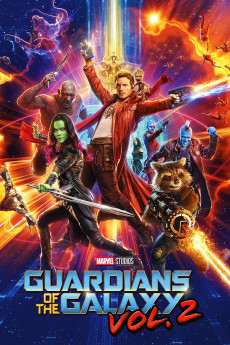
Guardians of the Galaxy Vol. 2 (2017)
Género: Action , Adventure , Comedy , Sci-Fi
Año: 2017
Formato: 4K
Runtime: 136
Resumen
After saving Xandar from Ronan the Accuser, the Guardians of the Galaxy have been widely recognized as heroes and they have been on a series of heroic missions to protect the galaxy from dangerous threats. Peter's leadership is soon put to the test, when he learns his biological father is Ego and he starts to develop romantic feelings for Gamora. Determined to learn more about his past, Peter decides to go with Gamora and Drax to visit Ego on his planet. Rocket and Groot stay behind to guard Nebula, so he can repair the damage on the ship after crash landing on a planet to avoid Ayesha and her army. During Peter's visit on his father's planet, he begins to learn that not everything is what it seems and some horrifying truths soon come to light for Peter and his friends. The heroes will start to face an even more dangerous threat than they are expecting.—dawsonpersi
También te puede interesar
Pasos para descargar y ver
1. ¿Cómo descargar?
Lo primero que hay que entender es que los contenidos no están alojados en nuestro servidor sino que se comparten entre usuarios. Al pinchar en descargar estás dando a un enlace que te da la información necesaria para descargar con el BitTorrent.
2. ¿Qué es el BitTorrent?
Todas las películas, series y demás, los tienen usuarios como tú en su ordenador y tú descargas de ellos y otros descargarán de ti. Es el sistema P2P (peer to peer). En nuestra web se comparte por el BitTorrent que es un sistema P2P muy conocido.
Para poder descargar las cosas necesitarás tener instalado un cliente Torrent.
3. ¿Qué cliente BitTorrent utilizar?
Hay varios clientes Torrent. Nosotros recomentamos utilizar el bitTorrent. Es muy ligero, fácil de usar, sin publicidad, no ralentiza tu ordenador…
Aquí podrás encontrar un manual sobre el BitTorrent y cómo instalarlo y configurarlo:
4. ¿Cómo ver las películas y series?
Si después de descargar axluna película o serie, tienes problemas para verla u oirla, te recomendamos que hagas lo siguiente.
Instala un pack de códecs, nosotros recomendamos el CCCP:
Si no lo tienes instalado, instálate este reproductor de vídeo, el Windows Media Player Classic:
https://www.free-codecs.com/download/Media_Player_Classic.htm
Reinicia el ordenador y se te deberían ver y oír correctamente las películas y series al abrirlas con el Windows Media Player Classic.