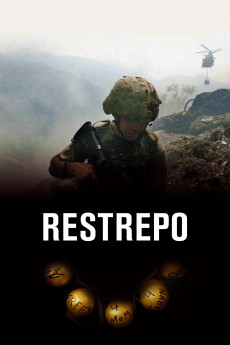
Restrepo (2010)
Género: Action , Biography , Documentary , History , News , War
Año: 2010
Formato: 4K
Runtime: 93
Resumen
In May 2007 the Second Platoon of Battle Company 2nd of the 503rd Infantry Regiment begins a 15 month deployment in the Korengal Valley of eastern Afghanistan, considered one of the most dangerous postings in the US Military. The young, inexperienced soldiers have so far only had a vague idea of war, but when they fly into the valley, they start to realize that this is going to be a living hell. They land on the Korengal outpost called The Kop. This is a terrace in the mountain, fortified with temporary protective walls. The Talibans are all around them, constantly shooting at them. Soon the first young soldier, Vimoto, is killed, and one month later Doc Restrepo. To get a better grip on the valley, Captain Kearney orders his men to capture a nearby mountaintop, and there erect a new outpost, which they call Restrepo in honor of their dead fellow. The most dangerous action during their deployment is Operation Rock Avalanche. They go into Taliban controlled land, where they end up in close combat, whereby Sergeant Rougle is killed. When their 15 months deployment is ended, the surviving young soldiers have irreparable, psychic problems.—Maths Jesperson {maths.jesperson1@comhem.se}
También te puede interesar
Pasos para descargar y ver
1. ¿Cómo descargar?
Lo primero que hay que entender es que los contenidos no están alojados en nuestro servidor sino que se comparten entre usuarios. Al pinchar en descargar estás dando a un enlace que te da la información necesaria para descargar con el BitTorrent.
2. ¿Qué es el BitTorrent?
Todas las películas, series y demás, los tienen usuarios como tú en su ordenador y tú descargas de ellos y otros descargarán de ti. Es el sistema P2P (peer to peer). En nuestra web se comparte por el BitTorrent que es un sistema P2P muy conocido.
Para poder descargar las cosas necesitarás tener instalado un cliente Torrent.
3. ¿Qué cliente BitTorrent utilizar?
Hay varios clientes Torrent. Nosotros recomentamos utilizar el bitTorrent. Es muy ligero, fácil de usar, sin publicidad, no ralentiza tu ordenador…
Aquí podrás encontrar un manual sobre el BitTorrent y cómo instalarlo y configurarlo:
4. ¿Cómo ver las películas y series?
Si después de descargar axluna película o serie, tienes problemas para verla u oirla, te recomendamos que hagas lo siguiente.
Instala un pack de códecs, nosotros recomendamos el CCCP:
Si no lo tienes instalado, instálate este reproductor de vídeo, el Windows Media Player Classic:
https://www.free-codecs.com/download/Media_Player_Classic.htm
Reinicia el ordenador y se te deberían ver y oír correctamente las películas y series al abrirlas con el Windows Media Player Classic.