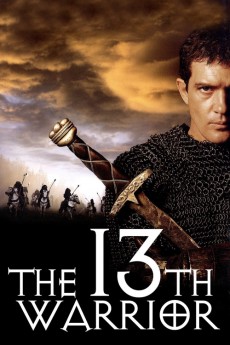
The 13th Warrior (1999)
Género: Action , Adventure , History
Año: 1999
Formato: 4K
Runtime: 102
Resumen
In AD 922, Arab Ahmad Ibn Fadlan is sent to the land of the Bulgar's as an emissary, because he fell in love with the wrong woman. During his journey, his caravan runs into a Vikings camp. They stay the night and the next day a young boy reaches the camp to call the warriors home: The Wendol, creatures of the Mist, have started attacking their homeland, killing and eating everyone in their way. The oracle forces a thirteenth warrior to accompany the Vikings, but this must not be a man from the north. Ahmad does not feel comfortable with the strange men of the north, at first, but when he finds out that the Wendol really exist, he bravely fights alongside the Vikings in an impossible battle against an enemy that can't be stopped.—Julian Reischl & Darcsyde
También te puede interesar
Pasos para descargar y ver
1. ¿Cómo descargar?
Lo primero que hay que entender es que los contenidos no están alojados en nuestro servidor sino que se comparten entre usuarios. Al pinchar en descargar estás dando a un enlace que te da la información necesaria para descargar con el BitTorrent.
2. ¿Qué es el BitTorrent?
Todas las películas, series y demás, los tienen usuarios como tú en su ordenador y tú descargas de ellos y otros descargarán de ti. Es el sistema P2P (peer to peer). En nuestra web se comparte por el BitTorrent que es un sistema P2P muy conocido.
Para poder descargar las cosas necesitarás tener instalado un cliente Torrent.
3. ¿Qué cliente BitTorrent utilizar?
Hay varios clientes Torrent. Nosotros recomentamos utilizar el bitTorrent. Es muy ligero, fácil de usar, sin publicidad, no ralentiza tu ordenador…
Aquí podrás encontrar un manual sobre el BitTorrent y cómo instalarlo y configurarlo:
4. ¿Cómo ver las películas y series?
Si después de descargar axluna película o serie, tienes problemas para verla u oirla, te recomendamos que hagas lo siguiente.
Instala un pack de códecs, nosotros recomendamos el CCCP:
Si no lo tienes instalado, instálate este reproductor de vídeo, el Windows Media Player Classic:
https://www.free-codecs.com/download/Media_Player_Classic.htm
Reinicia el ordenador y se te deberían ver y oír correctamente las películas y series al abrirlas con el Windows Media Player Classic.